Touchless accounts payable: AP automation software for SMEs with no implementation
Touchless accounts payable (paperless AP) means the software approves the invoice without anyone touching it. ininvoice ingests email, extracts data line by line with IDP, matches against PO and delivery note, and approves if everything ties out within tolerance (2% or EUR 1.50 per line). Realistic rate at SMEs: 60-80% according to the IOFM AP Benchmarking Report (2024). Live in 48 h, no consultant required.
If you are a CFO
See ROI, activation timeline and cost comparison vs Esker, SAP Concur and Basware.
If you are a controller
Technical stack view: ingestion, line-by-line IDP, three-way matching, risk scoring, exception routing.
If you are an SME CEO
Case of a distributor with 650 invoices/month and net savings calculation from the first month.
A business that processes 300 invoices a month with a two-person team spends between 60 and 90 hours per month managing those invoices by hand. Opening emails. Downloading attachments. Looking up the PO. Cross-checking the delivery note. Keying the figure into the accounting system. And starting over.
Touchless AP is not an aspirational goal. It is the result of automating each of those steps. This guide explains how the flow works. What rate is realistic. Where the human still steps in. And how to deploy it without changing your ERP or hiring a consultant.
EUR 249/month · up to 300 invoices/month · live in 48 h · no commitment.
What touchless AP is and is not
Touchless accounts payable (no-touch AP, touchless AP, automated accounts payable) is the percentage of supplier invoices processed without any member of the finance team needing to step in manually. From the moment the invoice arrives until the payment is approved, the system does the work.
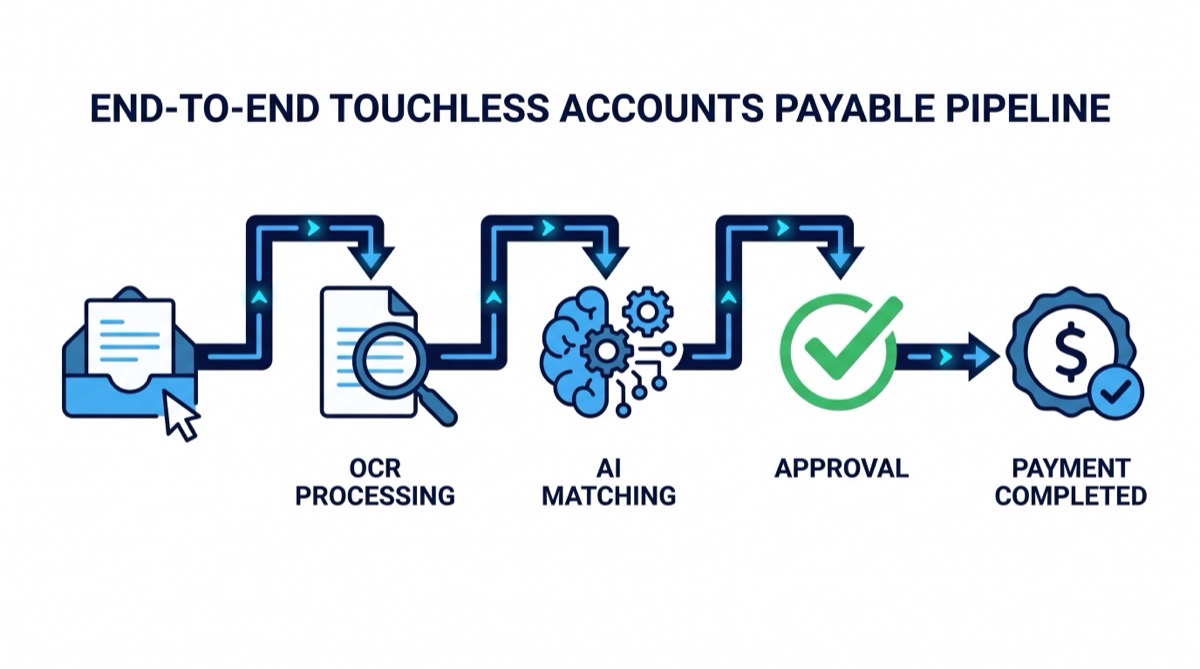
The standard flow of a touchless process has five phases:
- Ingestion. The invoice arrives by email (Gmail, Outlook) or by manual upload. The system captures it automatically.
- Extraction. OCR or IDP (Intelligent Document Processing) extracts every field: supplier, date, invoice number, lines with description, quantity, unit price, VAT, total.
- Reconciliation. The system looks up the matching purchase order and the goods receipt. It cross-checks every line. It verifies that what is being billed matches what was ordered and what was received. This phase is three-way matching.
- Decision. If the invoice ties out within the configured tolerances, it is approved automatically. If there is a discrepancy, an exception is raised and routed to the right owner.
- Export. The approved data is sent to the accounting system or ERP as a ready-to-post journal entry.
What touchless AP does not do
It does not execute the payment. ininvoice automates up to approval. The payment order is still issued by the finance team or the bank. The separation between approval and payment is an intentional internal control, not a limitation.
It is not an ERP. ininvoice does not handle accounting, fixed assets or HR. It is the layer that reconciles invoices before they reach the ERP. The ERP remains Holded, Sage, A3, SAP or whichever system the business already uses.
It does not replace the finance team. The goal of touchless AP is not to eliminate roles. It is so the team that used to spend 80 hours a month verifying invoices that tie out can spend that time analysing exceptions, negotiating with suppliers and improving payment terms.
The touchless rate: what it means and how to measure it
The touchless rate is the percentage of invoices processed without human intervention over the total invoices received in a given period.
touchless_rate = (invoices_auto_approved / total_invoices) × 100If out of 300 invoices received in a month, 210 are approved automatically and 90 require intervention, the touchless rate is 70%.
According to the IOFM, highly automated AP departments reach touchless rates of 60-80% under normal conditions. The remaining 20-40% are always legitimate exceptions: price variances, partial deliveries, new suppliers, invoices in non-standard formats.
Why 100% is not the right target. A 100% touchless rate would mean every invoice is approved automatically, including those with real issues. The goal is for the system to detect exceptions well and for the team to step in only on those that need human attention. A 75-80% rate with a near-zero post-approval error rate is an excellent result. A 95% rate with 5% of problem invoices approved without review is a failure.
The right way to measure the success of a touchless program is not just the automation rate, but the combination of touchless rate + error rate + exception resolution time.
What is your current touchless rate?
If your team reviews every invoice before approving it, your rate is close to 0%. Book a demo and start measuring it.
The technology stack of a touchless flow
The stack of a touchless flow has seven layers: ingestion, OCR/IDP, supplier classification, three-way matching, risk scoring, exception routing and export to ERP. Each layer is independent and can be activated progressively. A failure in one layer does not break the rest: it degrades the touchless rate.
Layer 1: document ingestion
Before an invoice can be processed, it has to be received. The most common sources:
- Email (Gmail, Outlook): the dominant channel for SMEs. Suppliers send the invoice as a PDF or image attachment.
- Supplier portals: some large suppliers run their own portal. They require integration or manual download.
- Structured electronic invoices: FacturaE (XML) in the Spanish public sector, Peppol BIS in the EU context. These formats are already structured; no OCR needed.
- Manual upload: for suppliers that send on paper or by fax (still around in 2026).
The effectiveness of the rest of the flow depends on the ingestion being complete. An invoice that does not enter the system cannot be processed. Touchless processes frequently fail right here: someone receives an invoice in a personal inbox, prints it, signs it and files it. The system does not know it exists.
Layer 2: OCR / IDP extraction
OCR (Optical Character Recognition) turns the PDF or image into text. But extracting text is not enough for a touchless flow. You need to understand the structure of the document: which field is the unit price, which is the quantity, where each line begins and ends.
That is what IDP (Intelligent Document Processing) does: it combines OCR with document understanding models to extract structured fields with their context. The practical difference:
| Basic OCR | IDP (Intelligent Document Processing) |
|---|---|
| Extracts text as a block | Extracts labelled fields: unit_price, quantity, description |
| Accuracy: 80-85% on line data | Accuracy: 95-98% on standard documents |
| Does not separate VAT from base price | Separates pre-tax unit price from VAT-inclusive total |
| Fails with complex tables | Handles multi-column tables and variable formats |
For three-way matching line by line, IDP accuracy is critical. If the system extracts EUR 0.12 as the unit price when the invoice says EUR 0.12 but with a dot as thousand separator (in some foreign formats), the matching fails even though the price is correct. IDP models well trained on Spanish and international invoices handle these variants.
Layer 3: supplier classification and matching
Once the invoice is extracted, the system maps it to the right supplier in its database. For known suppliers with a registered tax ID, it is trivial. For new suppliers or suppliers with name variants, the system uses fuzzy matching: it compares name, tax ID, IBAN, address and proposes them for validation. More on this technique in the guide on fuzzy matching in AP.
Layer 4: three-way matching reconciliation
The core layer of the touchless flow. The system looks up the matching purchase order (by PO number on the invoice, or by fuzzy match of supplier/amount/date) and the delivery note. It cross-checks line by line, applying the price and quantity variance formulas with the configured tolerances.
An invoice that passes this cross-check with no exceptions is ready for automatic approval. The full process detail is in the three-way matching guide.
Layer 5: scoring and risk detection
Before approving, the system assigns a risk score to every invoice: 0 (no risk) to 100 (high risk). The score aggregates signals: price variance, quantity, unverified new supplier, amount abnormally high vs the supplier history, possible duplicate. Invoices with a high score go to the front of the review queue. The team invests its time on the ones that need it most, not on the 200 routine invoices that tie out.
Layer 6: exception routing
Invoices that do not pass automatic matching are routed to the right owner: price variance to purchasing, wrong quantity to the warehouse, missing delivery note to receiving, potential duplicate blocked to finance. Without this layer, exceptions pile up with no owner and die in the controller's inbox.
Layer 7: export to ERP
Approved data leaves the system in the format the destination ERP accepts: CSV, API, native connector. The journal entry arrives at Holded, Sage, A3 or whatever system the business uses, ready to post, with no manual rekeying.
Why OCR alone is not enough
The key difference between OCR and IDP on invoices: OCR extracts text with a mean accuracy of 80-85% on line data; IDP extracts structured fields with semantic context with 95-98% accuracy on standard documents. For line-by-line three-way matching, that difference decides whether the flow is touchless or not.
Many businesses have tried to deploy a touchless flow with a basic OCR tool. The usual result: the tool works well with supplier A invoices and fails on supplier B because it uses a different table format. Or it extracts the VAT-inclusive total instead of the unit price. Or it confuses the invoice number with the PO number.
The problem is not raw text accuracy. A basic OCR can read text with 99% accuracy. The problem is structural understanding: what each field means, where the boundaries of each line are, how to tell a discount apart from an additional charge.
For three-way matching line by line, what you need is not extracted text but structured data: unit_price_pretax, quantity, product_description, tax_percentage, line_total. If OCR gives you a block of text without this structure, you have to build the understanding layer on top. That is exactly what IDP does.
Spanish invoices have their own quirks: VAT with multiple rates on the same invoice (21%, 10%, 4%), personal income tax withholdings on freelancer invoices, early-payment discounts as a separate line, corrective invoices. An IDP model trained on the Spanish tax ecosystem handles these variants. A generic OCR does not.
The approval cycle: from days to minutes
The manual approval cycle of an invoice has several stages, each with waits:
- The invoice arrives in the inbox. Someone downloads it. Waits until that person has time.
- The matching PO is looked up. If there is no PO number on the invoice, purchasing is asked. Wait.
- It is verified that what was received matches what was billed. The warehouse is called. Wait.
- If there is a discrepancy, the supplier is contacted. Wait.
- If all is fine, it is approved and keyed into the accounting system.
According to the IOFM, the average time per invoice in a manual process is 8 to 15 minutes under normal conditions. With 300 invoices a month, that is between 40 and 75 hours per month just on processing. Not counting the ones that raise exceptions and require further investigation.
With a touchless flow:
| Scenario | Processing time |
|---|---|
| Invoice that ties out (70-80% of cases) | Seconds. Zero human intervention. |
| Simple exception (small variance, known supplier) | 2-5 minutes for the owner with full context already prepared. |
| Complex exception (new supplier, invoice without PO, potential duplicate) | 10-30 minutes of investigation. |
The calculation for an SME with 300 invoices/month
Conservative assumptions:
- 300 invoices per month
- Touchless rate of 75% = 225 invoices automatically approved
- 75 exceptions, average resolution time: 10 minutes
- Fully loaded AP employee cost: EUR 22/hour (includes social security)
Total monthly time with touchless AP: 75 exceptions × 10 minutes = 12.5 hours.
Total monthly time without touchless AP: 300 invoices × 12 minutes (IOFM average) = 60 hours.
Savings: 47.5 hours per month × EUR 22 = EUR 1,045 per month in team time.
With ininvoice priced at EUR 249/month, the ROI in this scenario is positive from the first month.
Use case: distributor with invoices from multiple suppliers
[Estimate with explicit assumptions. Will be updated with real ininvoice customer data when available.]
A wholesale distributor of cleaning products with 120 active suppliers receives between 600 and 700 invoices per month. The finance team has two people: the admin lead and a part-time assistant.
Before automating, the process was as follows: invoices arrived to three different email accounts (the lead, the assistant and a generic one that sometimes nobody checked). Each one was downloaded, the PO was looked up in the ERP (Sage 50), it was checked against the paper delivery note from the warehouse and keyed into accounting. Full process for invoices with no issues: 10-12 minutes. For those with some problem: between 30 minutes and several days if the supplier had to be contacted.
Estimated monthly cost of the manual process:
- Admin lead: 3 hours/day on invoice handling × 22 working days = 66 hours
- Assistant: 1.5 hours/day × 22 days = 33 hours
- Total: 99 hours × EUR 22/hour = EUR 2,178/month in team time
With a touchless flow at 72% automation (estimate for a profile with well-formalised POs in Sage):
- Invoices automatically processed: 468 out of 650
- Exceptions needing attention: 182 × 10 minutes average = 30 hours
- Monthly cost with automation: 30 hours × EUR 22 + EUR 249 (ininvoice) = EUR 909/month
- Monthly savings: EUR 1,269
- Payback: immediate, from the first month
The figures above are estimates with explicit assumptions. The real variables that most affect the result are: the percentage of POs formalised in the ERP, the quality of the received PDFs and the discipline of the warehouse in recording receipts. In businesses where POs are informal or delivery notes are not recorded, the touchless rate will be lower until those upstream processes are improved.
EUR 249/month. Live in 48 h. No commitment.
ininvoice automates the full flow from the inbox. No implementation, no consultant, no ERP change.
Start freeExceptions: when and why a human steps in
20-30% of invoices in a well-configured touchless flow raise some exception. It is not a system failure; it is the system doing its job: identifying the cases that need attention before paying.
The most frequent exception types:
| Exception type | Usual cause | Owner | Urgency |
|---|---|---|---|
| Price variance | Supplier raised prices without notice | Purchasing | Normal |
| Quantity variance | Invoice bills more units than received | Warehouse | Normal |
| Unrecorded delivery note | Receiving has not confirmed the delivery | Receiving / logistics | High |
| PO not found | Invoice has no PO number and fuzzy match is inconclusive | Purchasing | Normal |
| Potential duplicate | Same invoice resent or recorded twice | Finance (immediate block) | Maximum |
| Unvalidated new supplier | Tax ID is not in the supplier database | Purchasing / finance | High |
| Amount outside historic range | Amount exceeds the risk threshold for that supplier | Finance | High |
The key is that the system hands every exception to the right owner with full context: which invoice, which line, how much the variance is, what the PO price was, how many units the delivery note recorded. The owner does not need to look anything up. They just need to make a decision: approve the variance, reject the invoice or contact the supplier.
More detail on how to structure exception routing in the guide on exception management in accounts payable.
Compliance and audit in a touchless flow
In Spain, invoices must be kept for 4 years under article 29.2 of Law 58/2003 General Tax Law, and 6 years under article 30 of the Commercial Code. A manual process files on paper or PDF. A touchless system records every approval with timestamp, applied rule and full data. The digital trail is more complete and easier to audit than any physical folder.
In a manual process, approval can be a signature on paper filed in a folder, or an email reply overwritten in the next thread. In a touchless system, every action is recorded with timestamp, user (if human) or system rule (if automatic), data justifying the decision and the invoice state before and after.
Legal obligations in Spain
Invoice retention. Article 29.2 of Law 58/2003 General Tax Law requires keeping invoices and other accounting documents for 4 years (the AEAT statute of limitations). Some sector-specific rules and commercial law require 6 years (art. 30 Commercial Code).
SII (Immediate Information Supply). Businesses with turnover above EUR 6 million per year are required to report to the AEAT issued and received invoices within 4 days of the accounting entry. A touchless flow speeds up the entry and provides the structured data needed for the SII filing. Check the specific obligations for your turnover with your tax adviser.
GDPR. ininvoice accesses the supplier invoice inbox in read-only mode. It does not store content from emails unrelated to invoices. Personal data that may appear on invoices (signer name, supplier contact details) is processed under the General Data Protection Regulation.
Touchless AP and ERP integration
[Diagram: end-to-end flow inbox → ininvoice → ERP: coming soon]
ininvoice does not compete with your ERP. It receives invoices before the ERP does, verifies them, and hands the ERP a ready-to-post entry: supplier, net amount, VAT breakdown, suggested ledger account, PO number. The ERP remains Holded, Sage 50/200, A3 ERP, SAP or whatever system the business already runs.
The full flow:
- Invoice arrives at the supplier invoice inbox.
- ininvoice captures, extracts, reconciles and approves (or raises an exception).
- Approved data is exported to the ERP as a ready-to-post journal entry: supplier, concept, net amount, VAT, ledger account suggested by the product category, related PO number.
- The bookkeeper posts the entry. They do not have to dig back into the PDF invoice; the data is already structured and verified.
This does not require a deep technical integration. The export can be a CSV in the format Holded, Sage or A3 accept. Native integrations are in development.
For businesses on SAP or Microsoft Dynamics, the situation is different: these ERPs ship their own AP modules. The decision to use ininvoice as an upstream layer or to activate the ERP's module depends on cost and implementation time. The SAP and Dynamics AP modules are powerful but require a consultant, customisation and between 3 and 12 months by typical mid-market ERP implementation data (indicative range from implementation consultancies; verify in your case). For businesses that need to start in weeks, not months, the specialised alternative is the more practical path.
The technical detail of the line-by-line cross-check, pre-tax variance formulas and the exception matrix is in the three-way matching guide. The difference between classic OCR and IDP — critical for the flow to be touchless on Spanish invoices with multiple VAT rates and withholdings — in IDP vs OCR on supplier invoices. The regulatory implication of Verifactu in Verifactu and accounts payable.
More on how ininvoice fits with European ERPs in the ERP integration guide.
How much it costs to deploy touchless AP
The cost of deploying a touchless flow varies hugely depending on the size of the business and the tool chosen.
| Solution | Monthly cost | Implementation | Activation timeline |
|---|---|---|---|
| ininvoice (European SME) | EUR 249/month | No consultant, no cost | Instant |
| Esker (mid-market) | On request | Consultant 3-6 months | 3-6 months |
| SAP Concur / Ariba | Enterprise pricing | Full implementation project | 6-18 months |
| Basware | On request | Specialised consultant | 4-12 months |
For European SMEs with 100-2,000 invoices a month, enterprise solutions make no sense either in cost or in timeline. The full comparison in AP automation software 2026.
ininvoice's cost is flat: EUR 249/month. No per-invoice fee, no implementation cost, no minimum commitment. If in month 3 you decide it is not worth the value, you cancel with no penalty. The risk model for the business is minimal.
How to start: the three prerequisites
To activate touchless AP you need three conditions: formalised POs, receipt recording and a single inbox for invoices. Without them, the system has no data to work against and the touchless rate starts below 30%. With the three in place, the starting point hits 60-70% in the first quarter.
1. Purchase orders in some system. It does not have to be a sophisticated ERP. It can be a well-structured spreadsheet with PO number, supplier, lines with quantity and price. What matters is that they exist as numbered documents before the invoice arrives.
2. Receipt recording. The warehouse or whoever receives the goods has to confirm what arrives. It can be a signed delivery note, an email confirmation or a note in the system. Without this record, three-way matching cannot verify the quantities.
3. Corporate email for invoices. All supplier invoices must arrive at the same Gmail or Outlook inbox. It is not enough for each supplier to send to a different contact. A dedicated alias (invoices@company.com) that forwards to Gmail is enough.
With these three conditions in place, ininvoice activation is self-service: you connect your inbox and it starts instantly. The system starts processing invoices from day one.
If POs or delivery notes do not exist in digital form yet, that does not block the launch. ininvoice can start processing just ingestion and extraction while the team formalises POs. The touchless rate will be low at first and improve as the PO base is completed.
Measure your touchless rate in 48 h
EUR 249/month · up to 300 invoices/month · no commitment · no implementation cost · all you need is Gmail or Outlook.
See demo with my invoicesCalculate your savings
The calculation is direct: (invoices/month × minutes/invoice) × touchless rate × hourly cost − EUR 249. With an hourly cost of EUR 22 (INE administration reference 2024), 12 minutes per manual invoice and a 75% touchless rate, the most common scenarios at European SMEs are:
| Invoices/month | Manual time (h) | Manual cost (EUR) | Touchless cost (h exceptions × EUR 22 + 249) | Net savings/month | Payback |
|---|---|---|---|---|---|
| 100 | 20 | 440 | 5 h × 22 + 249 = 359 | +EUR 81 | 1 month |
| 200 | 40 | 880 | 10 h × 22 + 249 = 469 | +EUR 411 | 1 month |
| 300 | 60 | 1,320 | 15 h × 22 + 249 = 579 | +EUR 741 | 1 month |
| 500 | 100 | 2,200 | 25 h × 22 + 249 = 799 | +EUR 1,401 | 1 month |
The scenarios assume a 75% touchless rate (realistic 60-80% range per IOFM in businesses with formalised POs), 12 minutes mean per invoice in a manual process (IOFM AP Benchmarking 2024 data) and a fully loaded cost of EUR 22/hour for an administrative profile (INE Salary Structure Survey reference). The calculation does not include additional savings from detected duplicates or from avoided overcharges by cross-checking prices against the PO. With those two effects, real ROI usually exceeds the figure estimated in this table.
The plan (EUR 249/month) covers up to 300 invoices/month. For higher volume, an Enterprise plan with custom pricing.
Frequently asked questions about touchless accounts payable
- What touchless rate is realistic for an SME?
- Between 60% and 80% under normal conditions, per IOFM benchmarks. The factor that has the most influence is the percentage of POs formalised in the ERP. In businesses that buy without a written PO, the rate starts below 30% and improves as POs are formalised.
- Do I need to change my ERP to activate touchless AP?
- No. ininvoice acts as a layer between the supplier inbox and the existing ERP. Approved data is exported to Holded, Sage 50/200, A3 or other systems as ready-to-post journal entries.
- What about invoices with no PO?
- The system attempts to create a retroactive PO from the invoice data and routes it to the purchasing team for validation. Until there is a formalised PO, that invoice is flagged as an exception and does not count in the touchless rate.
- What default tolerance is applied in automatic approval?
- 2% or EUR 1.50 per line, OR-mode (accepted if it meets either of the two criteria). Configurable per supplier, product category or globally. More detail in the three-way matching guide.
- And duplicate invoices?
- They are blocked automatically and never reach the approval phase. The check runs by invoice number, supplier tax ID, amount and date range (±30 days). More in the duplicate detection guide.
- Can ininvoice execute the payment directly?
- No. ininvoice automates up to approval. The payment order is still issued by the finance team or the bank. The separation between approval and payment is an intentional internal control, not a limitation.
- How does it affect SII and Verifactu obligations?
- A touchless flow speeds up accounting entries and provides the structured data needed for SII filing (4 days from posting). With the progressive rollout of Verifactu and mandatory electronic invoicing, data arrives structured from the source, which improves the touchless rate. Check the specific obligations for your turnover with your tax adviser.
- What is the difference between touchless AP and generic AP automation?
- AP automation is the set of tools that reduce manual work: OCR, approval workflows, integrations. Touchless AP is the end result when those tools combine well: a high share of invoices approved without any human touching them. A tool can automate a lot without delivering touchless rate if exceptions pile up unresolved.
- How long does it take to go live?
- Plug and play. Connect the inbox and it starts working. No implementation, no mandatory training, no upfront cost. The first invoices are processed from day one; the touchless rate improves as historical POs are loaded and tolerances are tuned per supplier.
- What if an automatically approved invoice turns out to be wrong?
- Every approval is logged with the rule that justified it (supplier, amount, lines, variance within tolerance). If an error appears later, the team can reverse the approval, tighten the tolerance for that supplier and block future similar cases. Traceability is more complete than in a manual process based on signatures.
Related content
- Three-way matching: complete guide
- Mandatory electronic invoice reception 2026 (RD 238/2026)
- Verifactu from the receiver side (2027)
- OCR for supplier invoices
- Software to manage received invoices
- Invoice to delivery note reconciliation
- IDP vs OCR on supplier invoices
- Touchless rate: how to measure it and benchmarks
- Price variance invoice vs PO: formula
- DSO and DPO in SMEs: cash cycle
- Invoice fraud: signals to detect it
- Invoice approval with digital workflow
- Touchless AP in organised hospitality
- Touchless AP in wholesale distribution
- AP automation in construction and subcontractors
- Excel for SME invoices: the breakpoint
- Holded integration for accounts payable
- Sage 50/200 integration
- Verifactu and accounts payable 2026
- Peppol BIS and B2B electronic invoicing
- Comparisons: ininvoice vs Tipalti, Esker, Yooz, Bill.com, Basware
- Supplier invoice control
Measure your touchless rate with your real invoices
Connect Gmail or Outlook. ininvoice processes the first invoice in minutes and shows you what share of yours could be approved with no intervention.
See demo with my invoicesEUR 249/month · up to 300 invoices/month · no commitment · no implementation cost · live in 48 h